In my continuing effort to make Observations easier to navigate, I'm trying out a new navigation tool. It looks like this
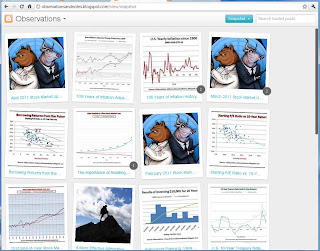
You can access it by
clicking on the image above, or the similar image located in the sidebar on the left.
Note: These views require modern browsers such as Internet Explorer 8+, Firefox 3.5+, Chrome or Safari -- else, will just take you back to the Home page.
Basic Navigation in the Snapshot View
Once you click on the image you will see:
- a snapshot from each Observations post, with the first 30 characters of the title -- similar to 12 snapshots in the image above, but larger.
- Mouse over any snapshot and you will see a short snippet from the post -- the first sentence or two.
- Click on a snapshot and you will be taken to the post. You will get the "short feed" for the post -- the first 200 words or so. (Note: You can navigate through the short feeds by using your <- and -> keys, or clicking on "older" or "newer" at the top of the page. "Back to all Posts" takes you back to the initial view.)
- To see the full post, click on the post title, or click on Read More at the end of the short feed.

